Pro & Studio
Four time slots. Picked by you.
Review the project, then send up to four suitable times. The client chooses from your options. Deposit and confirmation rules decide what happens next.
How the booking link works
 Built by a tattooer. For artists & studios.
Your shop manager in your pocket. Review the project, offer up to four times, and keep deposits and follow-ups with the booking. You decide what gets confirmed.
No card required. Create your account in the Affichr app and start your booking link setup.
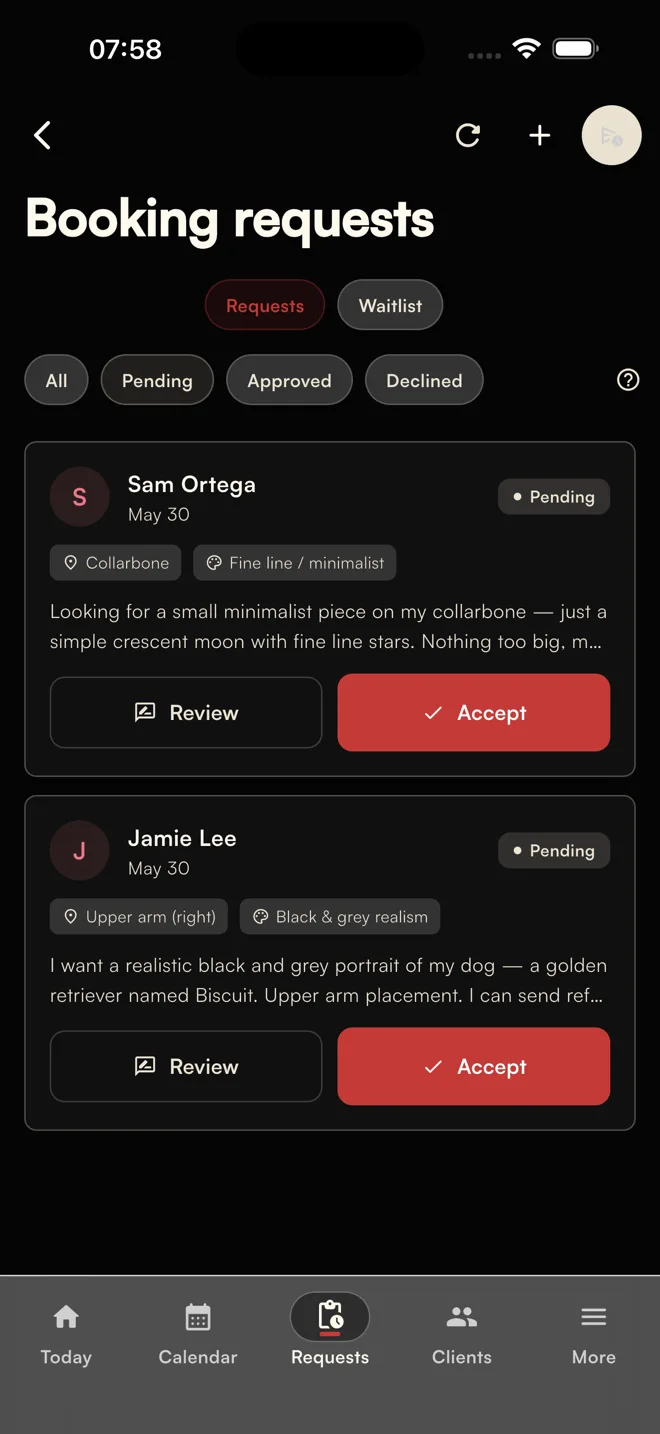
Your paper agenda can stay. Affichr keeps the request, deposit, and next step together. Explore the tattoo booking software workflow.
Idea, placement, references, budget, and preferred dates. Accept, decline, or ask for more before holding time.
You select the windows. The client chooses from your options, not your whole calendar.
Stripe payment status stays attached. Your rules decide when the appointment becomes confirmed.
Reminders and session notes stay in context. Choose whether to broadcast an opening to eligible clients whose preferred timing matches.
Review the project, then send up to four suitable times. The client chooses from your options. Deposit and confirmation rules decide what happens next.
How the booking link worksUse Affichr for day-to-day scheduling, connect Google Calendar, or keep your paper book as the final word. Review imported events before adding them.
Keep the paper agendaAdd your city and dates, then manage guest-spot alerts for clients who opted in. Studio also supports hosting visiting artists. Available channels depend on setup and consent.
See guest-spot featuresRoute requests by artist, style, or the soonest fit. Coordinate the shared calendar with owner, manager, and artist roles. Four artist seats are included.
Explore Studio modeBooking, calendar, clients, supplies, and the whole studio. Open a section to see exactly what is included.
The label shows the first plan that includes each feature. Pro includes Free; Studio includes Pro.
From the first idea to the times you decide to offer.
Keep the calendar you use connected to the work around it.
See what is paid, what is missing, and who needs the next step.
Keep the useful history close before and after the appointment.
Take the workflow with you, and keep supplies with the session.
Give each person the right view of the shop.
Read-only operational help. You make every decision.
Stripe, Google Calendar, SMS, email, push, and AI features depend on plan, setup, authorization, and provider availability. The built-in assistant cannot book, cancel, modify, or send anything; health answers and consultation or client notes stay outside its context.

Check the scanned details, then save the ink or needle lot with the session. Manual entry stays available.
Explore supply traceabilityScanner access depends on your plan and a supported mobile device.
Free for your booking link and agenda. Pro for deposits, time options, and follow-up. Studio for the whole shop.
50% off Pro yearly: $124.50 USD for year one with FTW. Renews at $249 USD/year after the promotion.
Studio monthly: $39.50 USD/month for the first 11 monthly bills with FUBAR, then $79 USD/month. Extra artist seats are billed separately.
Free is a permanent plan. Starting the Pro trial does not schedule a charge. Affichr takes 0% commission on your deposit amount. Standard Stripe processing fees still apply to the underlying payment.

Requests arrive. Deposits wait. Drawings are due. Affichr keeps those loose ends visible around the session—without pretending software does the tattoo.
In the chair / off the calendarAffichr is a tattoo booking app built by a tattooer. Clients send the idea, placement, references, budget, and preferred dates. You review the project before offering up to four suitable times. Your deposit and confirmation rules decide when the appointment is confirmed.
Free includes your public booking page, reviewed requests, up to 20 appointments per month, unlimited clients, Google Calendar sync, calendar import, and flash on your booking page. No card is required. Deposits, time options, and reminders are on Pro and Studio.
No. Affichr takes 0% commission on your deposit amount. Stripe processing fees still apply to the underlying payment, the same way they would on any other Stripe checkout.
The import wizard supports Google Calendar, iCal, and supported CSV files. Review the mapped events and client details before importing; results depend on the source export. Calendar import is available on every plan.
Yes. The Studio plan includes 4 artist seats, with extra seats available. Studios get a public studio booking page, artist invites, role-based access, and shared scheduling visibility.
No. Your paper agenda can stay the final word. Affichr handles what happens around it: complete requests, 4 slot offers, deposits, confirmations, reminders, cancellation broadcasts, and follow-up.
Affichr is available on iPhone and iPad through the App Store, and on the web. On Android, use Affichr in your browser.
You can export your data before cancellation. After cancellation, data is removed after a grace period in line with our privacy policy and applicable data protection requirements.
On Pro or Studio, review the request and choose up to four suitable times. The client selects one of your options. Your full calendar stays private, and your deposit and confirmation rules still apply.
Pro includes guest-spot dates and alerts for clients who opted in. Studio also supports hosted guest artists. Alert delivery depends on the configured channels, recipient preferences, and provider availability.
On a supported iPhone, Pro and Studio can scan ink and needle labels. Review the detected brand, lot, and expiry details before saving them with the session. Manual entry stays available; a scan does not verify sterility or regulatory compliance.
Create your booking link. Keep the agenda you trust. Add deposits, four time options, guest spots, or the whole studio when you need them.
Prepare your setup. Create your account at the end. No card required.
Affichr is operated by Nima Jolan, a sole proprietorship based in Montréal, Québec, Canada. Contact info@affichr.com. For help with your account, visit Affichr Support.

