
Tattoo booking software checklist: what to test
Bring a sample custom tattoo request to the demo. Use the same placement, references, budget, and availability in each tool you try. Then check the result of each action, not just whether a feature name appears on the pricing page.
| Feature | Try this | What should be clear |
|---|---|---|
| Project intake | Submit an idea, placement, size, reference image, budget, and preferred dates. | The artist can review the project without rebuilding it from separate messages. |
| Artist review and time offers | Ask for more detail, decline a request, then offer selected times for a suitable project. | A request is not a confirmed appointment. The artist controls which times the client can choose. |
| Deposit and confirmation rules | Follow a deposit from requested to paid; check a refund or reschedule too. | Payment status stays attached to the booking, and the settings explain when it becomes confirmed. |
| Reminders | Set the timing and channel, then check client preferences and a changed appointment time. | You know who should receive the reminder, when, and which provider or plan it requires. |
| Client history and private files | Reopen a past project and view it from the client side. | References, notes, consent, and design status stay in context; private artist notes remain private. |
| Cancellations and waitlists | Cancel an appointment and review the clients eligible for that opening. | You control whether to offer the time, and can see availability and communication preferences. |
| Appointment types | Create a consultation and a tattoo session for the same project. | The client can tell whether the visit is for discussing the piece or getting tattooed. |
| Studio roles and routing | Review the same request as an owner, manager, and artist. | It is clear who owns the next action and which client information each role can access. |
For a solo practice, start with intake, review, deposits, and reminders. Add team checks when someone else needs to route requests or help with the calendar. Check plan limits, payment fees, imports, and provider setup before choosing.
Look for a reviewable project, not just a name on a calendar.
A client can describe the piece but may not know how long it takes. Placement, scale, references, and technique can change the artist’s estimate. Intake should collect that context before the artist offers time; a consultation should remain distinct from the tattoo session.
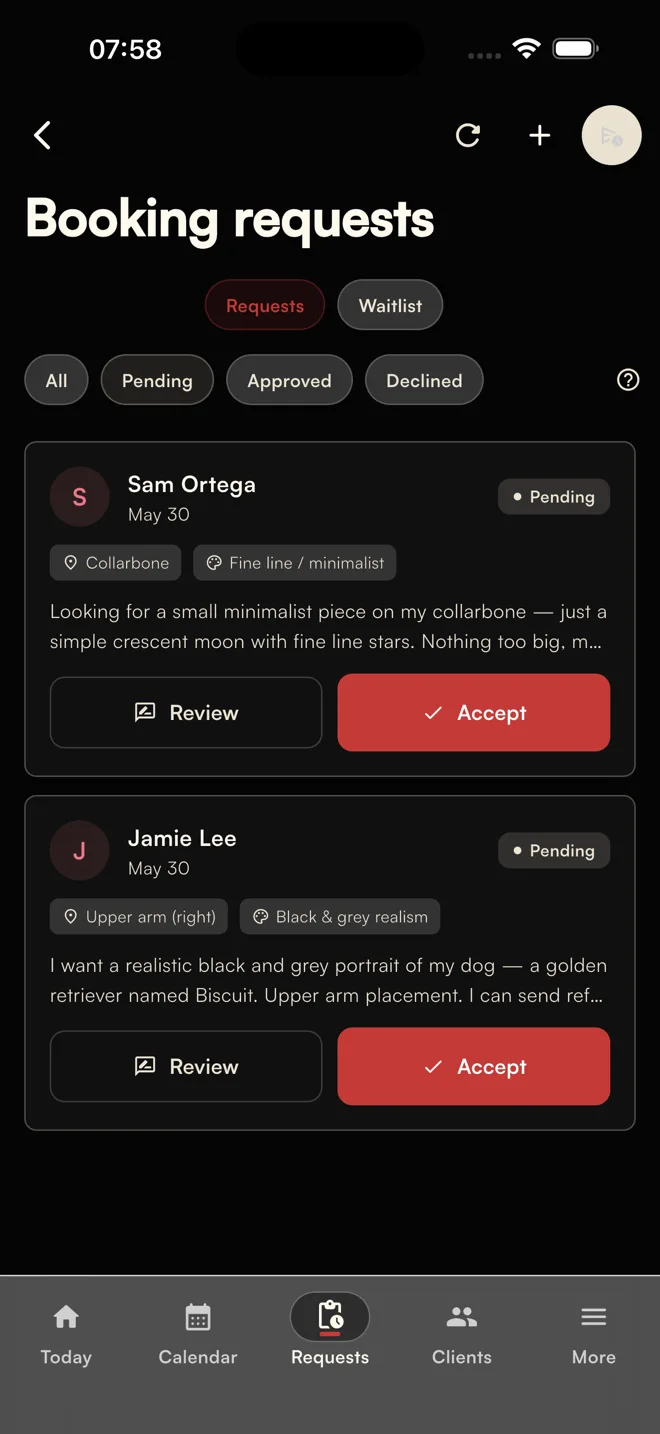
When testing another tool, ask whether you can return to those details without searching a DM thread. The tattoo booking form questions guide gives you an intake checklist to use for that test.
Check the deposit and reminder workflow together.
“Payments supported” does not tell you what happens to the appointment. Check pending and paid status, your confirmation rules, and the effect of rescheduling. A paid deposit and an artist-confirmed appointment are separate states unless your settings connect them.
For reminders, check the recipient, timing, channel, and communication preferences. Affichr’s email, SMS, payment, and calendar integrations depend on the plan, account setup, authorization, and provider availability. Test the channels you intend to use before relying on them.
Need wording to use while you evaluate the workflow? The free tattoo deposit and reminder scripts cover deposit requests, booking follow-up, and reschedules. Adapt the message to your own policy and the client’s preferences.
How Affichr handles the checks
Affichr starts with request review. The artist can ask for more information, decline, or offer up to four suitable times. Deposit status, appointment information, reminders, and client history stay connected, while the artist’s settings govern confirmation.
For the product workflow, see Affichr tattoo booking software. If you are deciding whether your existing calendar can do the job, read tattoo booking app vs appointment scheduler.
Where Studio mode changes the decision.
A solo artist can often survive with one calendar and one inbox. A shop has a different problem: requests have to be routed, artists need different visibility, managers need to help without taking over private notes, and cancellations should be fillable across the team.
Affichr Studio mode adds a public studio booking page, artist invitations, request routing, role-based access, shared scheduling visibility, and cancellation broadcasts. That is the difference between a tattoo appointment tool and tattoo shop management software.
FAQ
What features should tattoo booking software include?
Tattoo booking software should include project intake, artist review, selected appointment options, deposit settings, reminders, cancellation workflows, separate consultation and tattoo appointments, client notes, consent records, and private design approvals. Affichr lets the artist offer up to four suitable times.
Is online slot picking enough for tattoo artists?
Online slot picking is not enough for most custom tattoo work because the client cannot reliably estimate the time needed. The artist has to review placement, size, style, references, budget, and availability before protecting calendar time.
Should tattoo booking software include deposits?
Yes. Deposit status should stay attached to the request and appointment. Check how pending, paid, refunded, and applied deposits appear, which settings control confirmation, and what payment-provider setup is required. A paid deposit does not automatically mean every appointment is confirmed.
What should tattoo studios avoid in booking software?
Studios should avoid tools that expose the whole calendar before review, blur consultation and tattoo appointments, separate deposits from the booking, or leave important client details scattered across email, SMS, Instagram, Facebook, and WhatsApp.
What does Studio mode add for tattoo shops?
Studio mode adds a public studio booking page, artist invitations, request routing, owner, manager, and artist roles, role-aware scheduling visibility, and cancellation broadcasts.