
Compare the workflow before you compare the feature count
Try the same custom-tattoo request in each tool. Look at what the client submits, what the artist can decide, and what makes the appointment confirmed.
| Check | What to test in any scheduler | Affichr workflow |
|---|---|---|
| Project intake | Can references and project details arrive before a time is committed? Acuity documents custom intake forms during scheduling. | The client sends a tattoo request with project context for artist review. |
| Artist review | Can you require approval, and is a time already held while it is pending? Square supports accepting or declining requests. | Review the piece and duration before offering up to four selected times. |
| Deposit and confirmation | When is payment requested, and what happens if it is missing? Acuity supports deposits with a connected processor. | Track deposit status with the booking. Confirmation follows your settings; Stripe setup and plan access apply. |
| Client context | Can you find references, notes and the next action without rebuilding the project from messages? | Keep the request, appointment and client history connected. |
| Team handoff | Who reviews the request, who can act on it, and what can each team member see? | Studio adds request routing and role-aware visibility. Studio access is separate from the Pro trial. |
Scope: this is a workflow checklist from Affichr's founder, not an independent ranking or customer review. The examples below use official documentation checked September 7, 2026. Capabilities depend on the product, plan, region and setup.
What general scheduling tools already do
Do not rule out a tool just because it serves other trades. Square documents an accept-or-decline setting for appointment requests. Pending requests remain on its calendar until a decision. That is more control than an always-confirmed open calendar.
Acuity documents custom intake forms during scheduling and full payments, deposits or card collection after a payment processor is connected. Its intake forms accompany an appointment booking rather than acting as a standalone request form.
The useful question is whether the whole sequence fits your shop, including any configuration or extra tools. For named alternatives, see the tattoo booking software comparisons and source notes.
Test one custom request from start to confirmation
Example scenario, not a customer result: a client wants a detailed upper-arm piece but does not know the duration. Use that request to test four decisions:
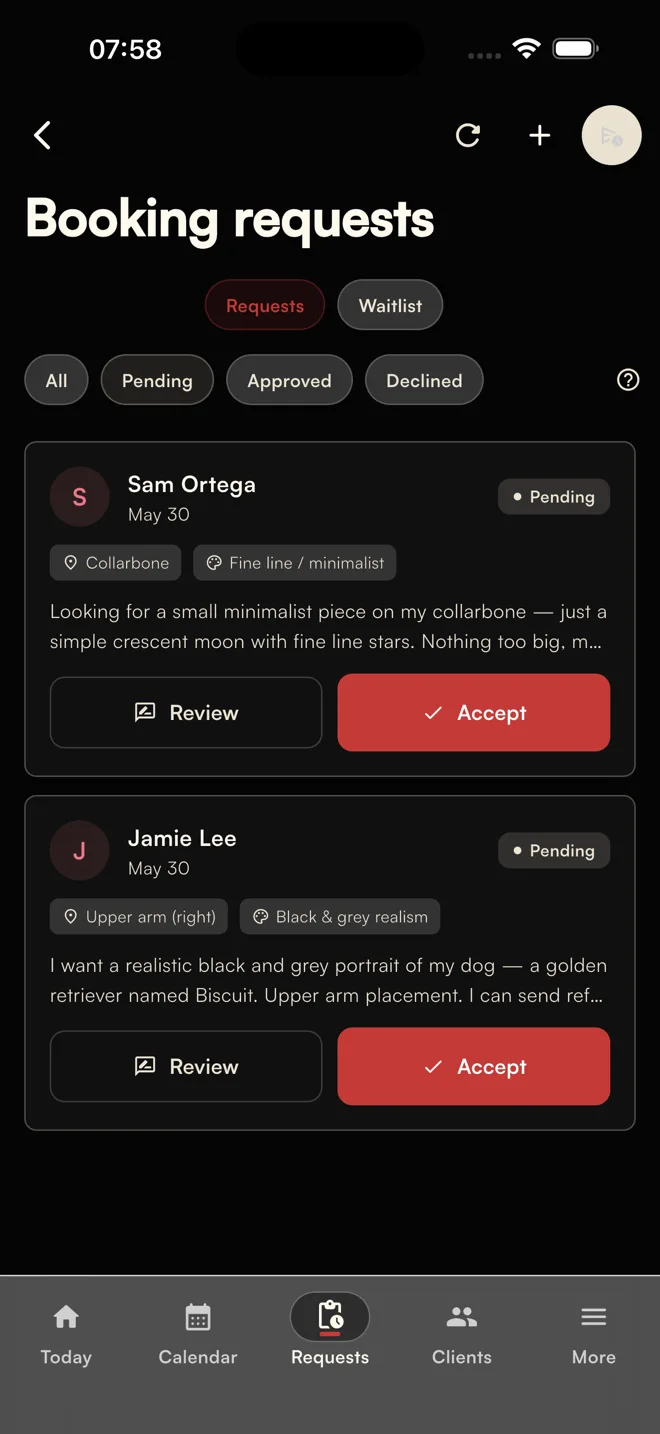
- Receive the brief. Collect the placement, size, references and preferred windows. The state is a request to review, not a paid appointment.
- Review the work. Decide fit, duration and whether a consultation is needed before the tattoo session.
- Offer suitable times. In Affichr, the artist can send up to four options. The client chooses from those options, not the entire custom-work calendar.
- Check the booking conditions. Follow the configured deposit and confirmation rules. An accepted request alone is not proof of payment or a confirmed appointment.
When your existing scheduler may be enough
If your services have predictable durations and your current setup already handles review, payment conditions and client context, a new tool may not be necessary. Test the parts that cause repeated manual work before moving the whole studio.
Affichr is worth evaluating when the request, artist decisions and follow-up get lost around the calendar. It is not a replacement for full retail POS, payroll or accounting software.
What should a tattoo appointment organizer track?
- Request details, references and review status.
- Time options, appointment duration and consultation or drawing deadlines.
- Deposit requested, pending or paid, kept distinct from appointment confirmation.
- Client notes, reminders and follow-up with the relevant access and communication preferences.
For a deeper evaluation, use the tattoo booking software feature checklist. For reminder wording and cancellation follow-through, see the tattoo appointment no-show kit.
Affichr covers the work around the slot
Affichr starts with the project and keeps the artist's decisions connected to the booking. Review the request, choose the times to offer, and follow the configured deposit and confirmation rules.
Plan access, payment-provider setup and communication preferences matter. Confirm those requirements before relying on payment collection or reminder delivery for a real appointment.
Compare the product pages for tattoo booking app and tattoo appointment scheduling software. For feature detail, read tattoo booking software features.
For studios, compare the management layer too.
Ask who should review a request, who can route it, and what an invited artist can see. Shared scheduling is useful only if the access matches how the team works.
Affichr's Studio workflow includes a public studio page, artist invitations, request routing and role-based visibility. Studio is a separate offer, not a feature included automatically in the Pro trial. See the tattoo shop management software page for the handoff and setup details.
FAQ
What is the difference between a tattoo booking app and an appointment scheduler?
Compare the booking sequence, not just the category name. General scheduling tools can include forms, payments and approval settings. Affichr starts with a tattoo project request, artist review and up to four artist-picked time options; deposit and confirmation rules decide when the appointment is confirmed.
Can a generic scheduler work for tattoo shops?
Yes, if its configuration fits the way the shop works. Test whether you can collect references, review the project and decide the duration before committing calendar time. Also check payment settings, team access and any extra tools or plans required.
Why should tattoo clients not always pick an open slot first?
A client may not know how much time the piece needs. A project the client estimates at three hours may need fifteen, so the artist has to review the idea before the calendar changes.
What should a tattoo appointment organizer track?
A tattoo appointment organizer should track the complete request, review status, artist-picked time options, deposit status, drawing or design deadlines, reminders, cancellation opportunities, client notes, and post-appointment follow-up beside the appointment.
What should a tattoo booking app keep together?
It should keep the request, references, client notes, artist-picked time options, deposit status, reminders, consent records, design approvals, consultation notes, waitlist context, and cancellation notes together.
When should a tattoo shop use Studio mode instead of a solo scheduler?
A shop should use Studio mode when multiple artists, a manager, or a front desk need shared booking visibility, request routing, artist roles, cancellation broadcasts, and a public studio booking page.